
WhatsApp Account Under Review? What It Means for GB WhatsApp Users (2026)
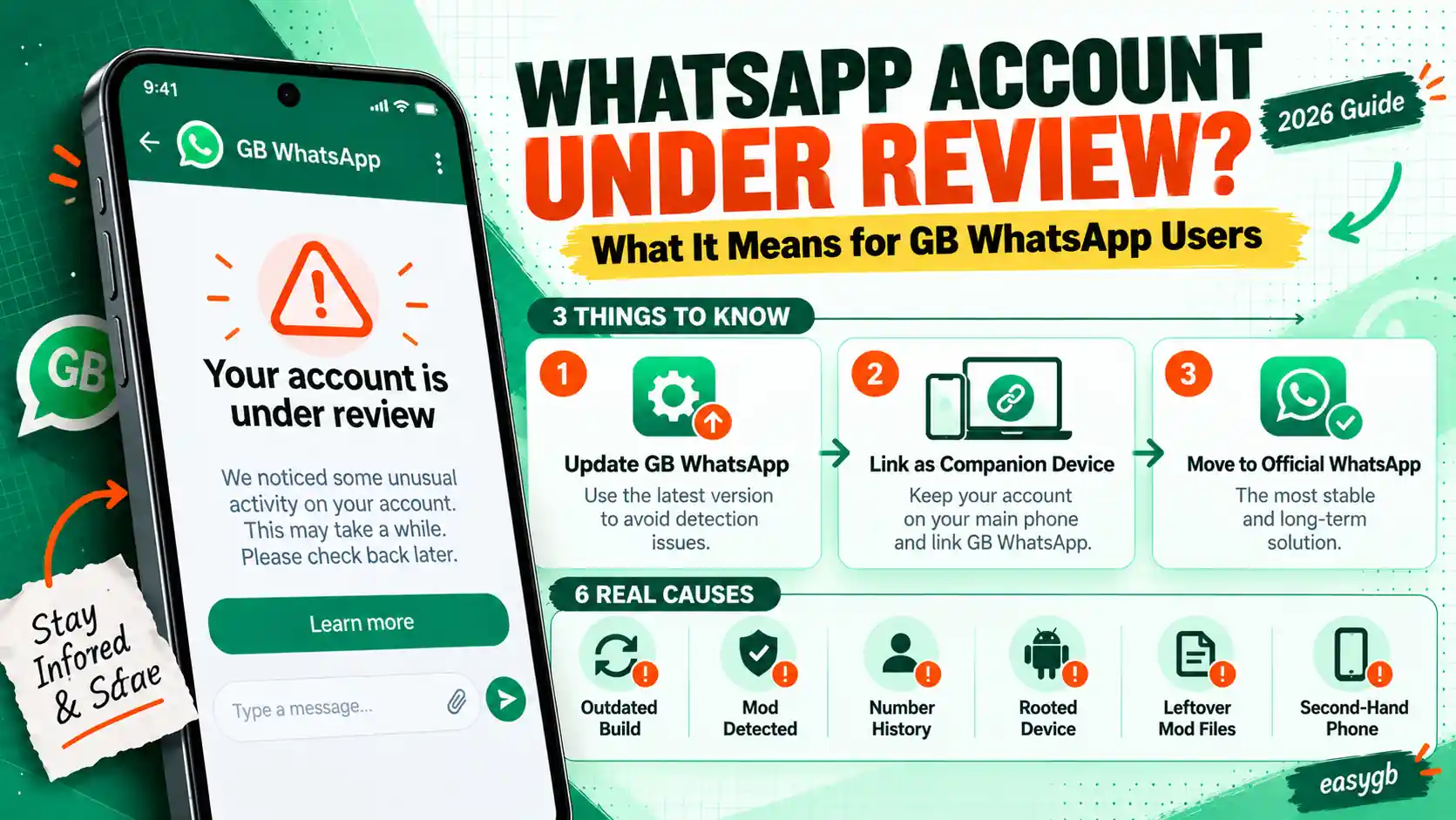
WhatsApp says your account is in review, and every feature is locked? Do not panic, and do not reinstall. Here is what the review really checks, why GB WhatsApp users see it more often, exactly what to do in the next 24 hours, and how to come out of it with your number and chats safe.
Your account is in review
We are checking your account activity and device information. Reviews are typically completed within 24 hours.
Requested: August 3, 2026
Learn moreWhat “Account in Review” Really Means
An account review is a pause, not a punishment. WhatsApp’s systems flagged something unusual, so they lock the account while they check your activity and device against the Terms of Service.
During that time you cannot send messages, make calls, or open chats. WhatsApp says most reviews finish within 24 hours, and you get a notification with the result.
The review screen looks scary because everything stops at once. However, it is a decision point, not a final verdict. What you do in these 24 hours has a real effect on how it ends, especially if GB WhatsApp is on your phone.
So the plan is simple: understand what was flagged, protect your chats, avoid the moves that make a review look worse, and know your options for each possible outcome.
A review usually ends within 24 hours. While you wait:
- Copy your GBWhatsApp backup folder to another device.
- Do not reinstall, clear data, or register the number on another app or phone.
- Uninstall GB WhatsApp and any other mod if you plan to stay on the official app.
- Wait for the notification, then follow the matching outcome below.
On this page Tap to open
Review vs Temporary Ban vs Permanent Ban
These three screens get mixed up constantly, yet each one calls for a different response. Check the wording on yours.
| Screen | What it means | How long | What you do |
|---|---|---|---|
| Your account is in review | WhatsApp is checking activity and device info | Usually up to 24 hours | Wait, protect chats, change nothing |
| Your account is temporarily banned | A modified app was detected | Shown by a countdown timer | Wait the timer out, then use official WhatsApp |
| This account is not allowed to use WhatsApp | A permanent ban | No end date | Request a review in official WhatsApp |
| You need the official WhatsApp | A login block on the app, not the account | Until you switch apps or methods | Use an accepted app or login method |
If your screen matches the last row, you are not under review at all. Follow our steps for the official WhatsApp login error instead.
The August 2026 Review Wave: What Happened
On the evening of Monday, August 3, 2026, users across India and other regions suddenly saw the review screen. Their accounts stayed locked for about 24 hours, which hit people who rely on WhatsApp for work especially hard.
- The screen said WhatsApp was checking account activity and device information, and that reviews typically finish within 24 hours.
- Access to messaging and calling stopped completely during the review.
- WhatsApp’s response: a spokesperson said the company works to stay ahead of abuse, admitted that its systems sometimes get it wrong, and said it works to fix such errors quickly.
- The cause was never fully explained. Reports could not confirm whether it was an automated sweep, an anti spam push, or a technical issue.
What this tells you: reviews can hit normal users too, including people who only use official WhatsApp. So a review alone does not prove you did anything wrong.
Why GB WhatsApp Users Get Flagged More Often
A review checks two things: what your account does, and what device and app it runs on. GB WhatsApp raises flags on both.
| Trigger | Why it matters | GB WhatsApp effect |
|---|---|---|
| Unofficial app fingerprint | WhatsApp checks which client connects | Higher risk, especially on older builds |
| Bulk or scheduled messages | Looks like spam automation | GB scheduler and broadcast tools raise it |
| Auto reply to many chats | Looks like a bot | GB auto reply raises it |
| Many reports or blocks | Contacts flag unwanted messages | Same for every app |
| Frequent reinstalls and new devices | Looks like account takeover | Common with mod users switching builds |
None of these guarantee a review. Still, each one adds weight, so a GB user who forwards in bulk and reinstalls often stacks the odds against themselves.
Protect Your Chats Before Anything Else
A review does not delete messages, but you cannot open the app to back up. So rely on the local files already on your phone.
- Open your file manager and go to Android, then media, then com.gbwhatsapp.
- Copy the whole GBWhatsApp folder to a computer, USB drive, or cloud storage.
- Check the Databases folder inside; the newest msgstore file is your latest backup.
If the review ends in a ban and you later get your number back, this copy is what brings your chats home. Our guide to restoring a GB WhatsApp backup covers every folder and file.
During the ReviewThe next 24 hours decide a lot.
What to Do During the Review
Do
- Keep the SIM active and in your usual phone
- Keep your backup folder copied somewhere safe
- Uninstall GB WhatsApp and other mods if you plan to stay official
- Tell important contacts to reach you another way for a day
Do not
- Reinstall the app or clear its data
- Register the number on another phone or mod
- Request new verification codes again and again
- Pay anyone who claims they can speed it up
Why does this matter? Reinstalling and switching devices look exactly like the account takeover patterns the review checks for. Staying still gives the review a clean picture.
How a Review Usually Unfolds
- StartThe account locksThe review screen appears with the date it started. Every feature stops.
- HoursWhatsApp checksAutomated systems and, in some cases, people review activity and device information.
- 24 hoursA decision arrivesWhatsApp says most reviews finish within this window and sends a notification.
- OutcomeRestored or restrictedThe account unlocks, or the screen changes to a ban or a login block.
After the ReviewThree possible outcomes, three plans.
What Happens After the Review
Outcome 1: Your account is restored
- Open official WhatsApp and check that chats and groups load.
- Turn on two step verification and a passkey right away.
- If you were on GB WhatsApp, decide carefully before going back; see the next section.
Outcome 2: The review turns into a ban
If the screen now says your account is temporarily banned, wait out the timer and move to official WhatsApp. If it says the account is not allowed to use WhatsApp, install official WhatsApp, enter your number, and tap Request a review. Keep any appeal short, honest, and in one message.
Outcome 3: You see the official WhatsApp login error
This means WhatsApp accepted your number but refuses the modified app. Log in on official WhatsApp instead, or link GB WhatsApp to it as a companion device.
Special Cases: Business Numbers, Linked Devices, and Shared Phones
Your WhatsApp Business number is under review
The process is the same, but the cost of a lost day is higher. Post a short notice on your website, Instagram, or Google Business Profile with another way to reach you. Avoid sending broadcast lists for a while after the account returns, since bulk sends are a common trigger.
GB WhatsApp runs as a linked device
If official WhatsApp is your main app and GB WhatsApp is only linked, a review usually affects the main account, and every linked device stops too. Once the account returns, consider removing the GB session from Linked devices for a few weeks to lower the chance of another flag.
Someone else used your phone or number
If you never installed a mod and never sent bulk messages, the review may come from suspicious login attempts. After it ends, check Linked devices for sessions you do not recognize, log them out, and turn on two step verification with a password and a passkey.
You see a review right after changing phones
A new phone, a factory reset, and a fresh verification in one day can look like an account takeover. That is usually harmless. Stay on the new phone, avoid repeated verifications, and let the review finish.
Review Taking Longer Than 24 Hours?
Most reviews finish within a day, but WhatsApp publishes no hard limit, and busy periods like the August 2026 wave can stretch it.
- Restart your phone once and open WhatsApp to refresh the status.
- Make sure the app is updated from the Play Store if you are on official WhatsApp.
- After 48 hours, use Help or Contact us from the review screen once, with your number and the date the review started.
- Still do not reinstall. A fresh install will not skip the review and can add verification timers.
Should You Go Back to GB WhatsApp After a Review?
A review is a warning shot. Your number is now on WhatsApp’s radar, so returning to a mod right away carries a higher chance of a ban next time.
- Safest: keep this number on official WhatsApp for good.
- Middle ground: keep official WhatsApp as the main app and link GB WhatsApp as a companion device, so detection usually hits the linked session first.
- If you want full GB features: use a separate, secondary number, and install the latest build from our GB WhatsApp download page.
How to Avoid Another Review
- Avoid bulk messages, mass forwarding, and adding strangers to groups.
- Turn off GB WhatsApp auto reply and the message scheduler on any important number.
- Stop reinstalling and switching builds often; update in place instead.
- Keep two step verification on so nobody else can register your number.
- Copy your backup folder to another device every week.
Frequently Asked Questions
What does account in review mean on WhatsApp?
WhatsApp is checking your account activity and device information against its rules. The account is locked during the check, which usually takes up to 24 hours.
Is account in review the same as a ban?
No. A review is a temporary check. It can end with the account restored, or it can turn into a temporary or permanent ban.
How long does a WhatsApp account review take?
WhatsApp says most reviews finish within 24 hours. Some take longer during busy periods.
Why is my GB WhatsApp account under review?
WhatsApp may have detected the modified app, bulk or automated messages, many reports, or frequent reinstalls. Sometimes its systems also flag accounts by mistake.
Can I use WhatsApp during the review?
No. Messaging and calling stay locked until the review finishes.
Should I reinstall WhatsApp during a review?
No. Reinstalling does not skip the review and can look like suspicious activity. Wait for the result instead.
Will I lose my chats during an account review?
Not if you keep your backup folder safe. Copy the GBWhatsApp folder to another device while you wait.
What happened to WhatsApp accounts on August 3, 2026?
Many accounts, including many in India, were placed under review for about 24 hours. WhatsApp said its systems sometimes get it wrong and that it fixes errors quickly.
What should I do if the review turns into a ban?
For a temporary ban, wait the timer out and switch to official WhatsApp. For a permanent ban, request a review in official WhatsApp.
Can I appeal an account review?
You usually just wait for it to finish. If it turns into a permanent ban, you can then tap Request a review in official WhatsApp.
Can official WhatsApp users get put under review?
Yes. Reviews can affect anyone, including users who never installed a mod.
Is it safe to go back to GB WhatsApp after a review?
It is risky. Use official WhatsApp on that number, or move GB WhatsApp to a separate secondary number.
My review has lasted more than two days. What now?
Restart the phone once, then use Help or Contact us on the review screen with your number and start date. Do not reinstall.
Can someone speed up my WhatsApp review for money?
No. Only WhatsApp decides reviews. Paid services are scams and may try to steal your account.
Sources and Further Reading
- Business Today: accounts placed under review and WhatsApp’s statement (August 4, 2026)
- Gulf News: why some users lost access for 24 hours
- YourStory: user reports from the August 2026 review wave
- WhatsApp Help Center: account reviews, bans, and unofficial apps
One Comment