GB WhatsApp Old Versions: Full Changelog and APK Archive (2016 to 2026)
Every major GB WhatsApp release from v5.30 to v26.97, with dates, sizes, changes, and an honest status check on which builds still log in. Updated October 17, 2026.
v26.97
Latest Build
Oct 7
Released 2026
6.0+
Android Advised
20+
Versions Listed
What This Guide CoversTap to open
Quick Answer: Which GB WhatsApp Version Should You Use?
Use the latest build, GB WhatsApp v26.97, released on October 7, 2026 by Abu Saleh (9aleh). It fixes the connection bug from v26.90 and carries the freshest antiban code.
Old versions still matter, though. You might need one to escape a buggy update or to test a build before switching. But here is the catch most archive pages hide: WhatsApp’s servers refuse very old builds. So most versions below are now for reference, not daily use.
- Works now: v26.97 and, for a short while, v26.90
- Rollback option: the build right before your current one
- Archive only: anything from 2024 and earlier
Which Old GB WhatsApp Versions Still Work in October 2026?
This is the question every visitor actually has, so here is a straight status check. We base it on two facts. First, WhatsApp blocks app versions that fall too far behind. Second, GB WhatsApp builds carry their own expiry date.
| Version | Released | Status Today | Use It For |
|---|---|---|---|
| v26.97 | October 2026 | Works | Daily use |
| v26.90 | September 2026 | Works, but has a connection bug on some phones | Short rollback only |
| v26.86 | August 2026 | May show expired soon | Testing only |
| v18.x builds | 2025 to 2026 | Older branch, may show expired | Reference |
| v17.x and older | 2016 to 2025 | Cannot log in | Archive only |
Practical rule: never stay more than one release behind. The further back you go, the more likely you hit an expired message, a failed login, or a ban.
Important: WhatsApp Now Needs Android 6.0 or Newer
On September 8, 2026, WhatsApp ended support for Android 5.0 and 5.1 (Lollipop). The minimum is now Android 6.0 (Marshmallow) for both WhatsApp Messenger and WhatsApp Business.
Because GB WhatsApp builds on top of official WhatsApp, this change affects it too. So an old GB build will not rescue an old phone anymore. If your phone runs Android 5.x or older, no current GB version will reliably connect.
- Android 6.0 or newer: install v26.97
- Android 5.0 or 5.1: expect connection failures on every current build
- Android 4.4 or older: WhatsApp dropped KitKat on January 1, 2025, so nothing works
To check your Android version, open Settings, then About Phone, then Software Information.
GB WhatsApp Version Archive: Every Release by Year
Tap a year to open it. Each version shows its release date, approximate file size, minimum Android version, and current status. Dates for older branch builds are approximate, because those developers rarely published exact release notes.
2026: Current Line (v26.x)
3 builds
GB WhatsApp v26.97
Fixes the connection and linking failures from v26.90, with a stability overhaul and refreshed antiban signatures. This is the build to use.
GB WhatsApp v26.90
Stability fixes and new features. However, some phones got stuck on “Connecting,” which v26.97 fixed.
GB WhatsApp v26.86
Moved to WhatsApp base 2.26.28, added direct login by number, and improved device linking.
2026: Older Branch (v18.x)
3 builds
GB WhatsApp v18.80
Older branch build with antiban updates, Android 15 support, and bug fixes.
GB WhatsApp v18.75
Media sharing improvements and privacy refinements.
GB WhatsApp v18.70
Performance work, crash fixes, and better background notifications.
2025 Releases
5 builds
GB WhatsApp v18.30
Chat customization updates, a newer WhatsApp base, and a redesigned theme picker.
GB WhatsApp v18.10
Faster media loading, better video status support, and steadier dual accounts.
GB WhatsApp v17.85
More privacy options, Ghost Mode improvements, and bug fixes.
GB WhatsApp v17.80
Notification management, chat lock improvements, and group admin controls.
GB WhatsApp v17.60
A newer WhatsApp base and better stability on mid range phones.
2024 Releases
1 build
GB WhatsApp v17.52
New themes, better message reactions, and larger document sharing.
2023 Releases
2 builds
GB WhatsApp v17.70
WhatsApp base sync, small interface fixes, and steadier status downloads.
GB WhatsApp v14.00
Status download fixes, a message scheduler, and sticker pack updates.
2022 Releases
2 builds
GB WhatsApp v8.75
The last big v8 release, with anti delete, privacy controls, and bulk message tools.
GB WhatsApp v8.40
Privacy improvements, Ghost Mode tweaks, and a smaller file for low end phones.
2016 to 2021 (Legacy)
6 builds
GB WhatsApp v7.91
Better anti delete, custom sounds per contact, and a refreshed theme store.
GB WhatsApp v7.20
Faster startup and fixes to media auto download.
GB WhatsApp v6.85
Theme updates, better emoji support, and broadcast fixes.
GB WhatsApp v6.70
More media sharing options, bubble styles, and new fonts.
GB WhatsApp v6.00
A new WhatsApp base, icon packs, and early status download.
GB WhatsApp v5.30
One of the earliest builds, with custom themes, hidden last seen, and a second account.
Legacy builds cannot log in. WhatsApp’s servers reject these old clients, so they cannot verify your number or send messages. We keep them listed for history and reference only.
Why GB WhatsApp Version Numbers Jump Around
You may wonder why v18.80 and v26.97 both appear in 2026. The answer is simple: different developers ship their own builds under the GB WhatsApp name, and each one counts differently.
| Line | Developer | Example Versions | Status |
|---|---|---|---|
| v26.x | Abu Saleh (9aleh) | v26.86, v26.90, v26.97 | Current, actively updated |
| v17.x to v18.x | AlexMODs and other builders | v17.85, v18.80 | Older branch |
| v6.x to v8.x | Early builders such as HeyMods and AlexMODs | v6.70, v8.75 | Legacy |
| v5.x | Original GBMods era | v5.30 | Legacy |
So a higher number does not always mean a newer app across lines. Within the v26 line, Abu Saleh lists the WhatsApp base in his changelog. For example, v26.86 runs on WhatsApp base 2.26.28. That base number tells you how current the underlying app really is.
Switching lines? Moving from a v18.x build to v26.97 usually needs a clean uninstall first, because each line uses its own app signature. Back up before you switch.
Why People Download Old GB WhatsApp Versions
- A buggy update: a new build breaks notifications, media, or login, and the previous build worked fine
- Testing: careful users keep the previous APK as a fallback before updating
- A feature they liked: an older interface or setting disappeared in a newer build
- Storage: older files are smaller on phones with little space
- Old phones: once a common reason, but the Android 6.0 rule now blocks most of these cases
Notice that only the first two reasons still work well in 2026. For everything else, the latest build is the safer pick.
Which GB WhatsApp Version Should You Pick?
| Your Situation | Best Choice |
|---|---|
| Android 6.0 or newer, everyday use | v26.97 |
| v26.97 crashes on your phone | v26.90 for a few days, then try v26.97 again |
| You run a v18.x build | Back up, uninstall, and install v26.97 |
| Android 5.x phone | No current build connects reliably, so consider a newer phone |
| You want a build for testing | The version just before your current one |
How to Downgrade GB WhatsApp Safely
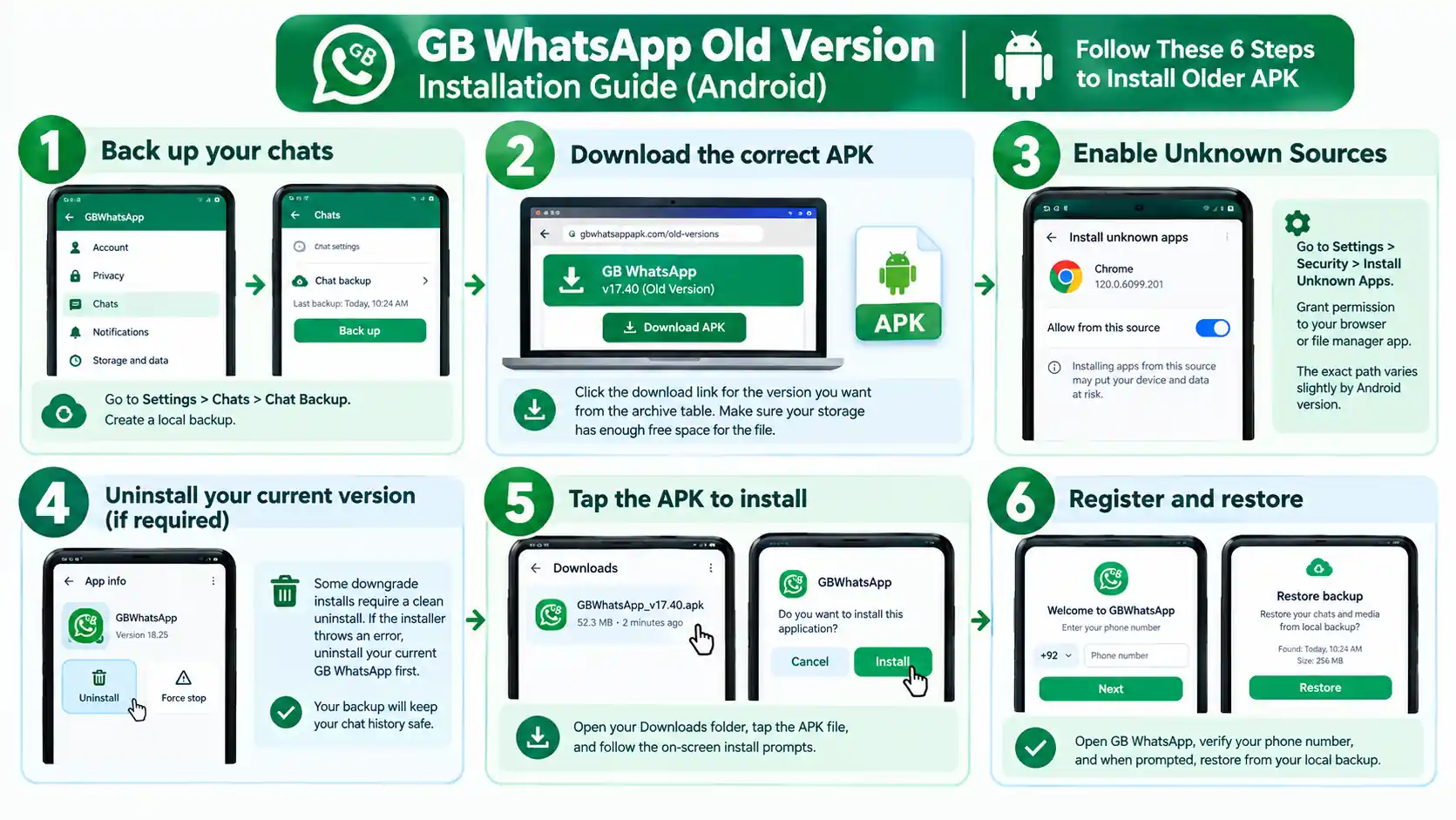
Android does not allow installing an older version over a newer one. So a downgrade always means uninstalling first. Follow these steps in order, and you keep your chats.
- Back up. Open GB WhatsApp, then Settings, then Chats, then Chat Backup, and tap Back Up
- Copy the backup. Copy the whole GBWhatsApp folder from internal storage to your PC or another safe place
- Download the older APK and check that its size matches the archive
- Uninstall your current GB WhatsApp. Your backup folder stays on the phone
- Install the older APK. Allow Install Unknown Apps for your file manager if asked
- Verify your number and tap Restore when the app finds the backup
Will My Chats Restore on an Older Version?
Usually yes, when you go back just one step. However, a backup made by a much newer build can fail to restore on a much older one, because WhatsApp changes its database format over time. Most competitor pages skip this, and it causes most “lost chats” stories.
- Going back one release: restore usually works
- Going back several releases: restore may fail or skip recent chats
- Switching between developer lines: back up, then restore on the same or a newer base
- Always keep a copy of the backup folder before any downgrade
If restore fails: install the newer version again, restore there, and stay on it. Your copied backup folder makes this safe.
How to Fix “This Version of GB WhatsApp Has Expired”
Every GB WhatsApp build carries an expiry date set by its developer. Separately, WhatsApp stops accepting outdated clients. Either one can trigger an expired message on an old version.
- Back up your chats if the app still opens
- Download v26.97 from our download page
- Install it over the old app, or uninstall first if Android blocks it
- Verify your number and restore
Changing your phone’s date to trick the expiry check does not help for long, and it breaks other apps. Updating is the only real fix. If the new build then refuses to open, work through our GB WhatsApp keeps stopping fixes.
Old Versions vs the Latest Version
| Feature | Old Builds (2024 and earlier) | Latest v26.97 |
|---|---|---|
| Logs in today | No | Yes |
| Antiban protection | Outdated | Current |
| WhatsApp Channels | Missing in early builds | Supported |
| Device linking | Limited or missing | Supported |
| Android 14 and 15 support | Missing | Supported |
| Ghost Mode and privacy tools | Basic | Full set |
| Message scheduler and auto reply | Missing in early builds | Supported |
| File size | Smaller | About 133 MB |
| Security fixes | None | Latest available |
Is It Safe to Download Old GB WhatsApp Versions?
Old builds carry two extra risks. First, they miss security fixes that newer builds include. Second, old APK files float around the internet for years, and many get repacked with adware along the way. Our full GB WhatsApp risk review explains what that means for your account.
- Download only from an archive that lists file sizes, and compare the size before installing
- Scan the APK on VirusTotal. A clean mod may show one or two generic flags, but many detections mean delete it
- Uninstall any build that asks for Accessibility Service or Device Admin access
- Use old builds briefly, then move back to the latest version
Do Old Versions Get Banned More Often?
Yes. Antiban code works by making GB WhatsApp look like a current official client. As builds age, WhatsApp learns their fingerprint, so detection gets easier. That is why old builds carry a higher ban risk than the latest one.
Lower your risk: stay on the newest build, use a secondary number, turn on two step verification, and avoid bulk messaging.
Final Verdict
Treat this archive as a history book and a short term safety net. For daily use, install v26.97 on a phone running Android 6.0 or newer. If an update misbehaves, roll back one step, restore your backup, and move forward again once a fix lands.
Frequently Asked Questions About GB WhatsApp Old Versions
What is the latest GB WhatsApp version?
The latest version is v26.97, released on October 7, 2026 by Abu Saleh (9aleh). It is about 133 MB.
Can I still use old versions of GB WhatsApp?
Only recent ones. Builds from 2024 and earlier cannot log in, because WhatsApp rejects outdated clients.
Which old GB WhatsApp version still works?
In October 2026, v26.90 still works as a short term rollback. Older builds may show an expired message or fail to log in.
How do I downgrade GB WhatsApp?
Back up your chats, copy the GBWhatsApp folder, uninstall the current app, install the older APK, verify your number, and restore.
Why can’t I install an old version over the new one?
Android blocks installing a lower version over a higher one. You must uninstall the newer build first.
Will I lose my chats if I downgrade?
Not if you back up first. A backup usually restores when you go back one release, but it may fail across several releases.
Why does my old GB WhatsApp say expired?
Each build has a developer set expiry date, and WhatsApp stops accepting outdated clients. Updating to v26.97 fixes it.
What Android version does GB WhatsApp need now?
Android 6.0 or newer. WhatsApp dropped Android 5.0 and 5.1 on September 8, 2026, and GB WhatsApp follows the official app.
Can I use GB WhatsApp on Android 5.1?
Not reliably anymore. Since September 8, 2026, WhatsApp no longer supports Android 5.x, so current builds may fail to connect.
Is there a GB WhatsApp version for Android 4.4 KitKat?
Old builds exist, but WhatsApp dropped KitKat on January 1, 2025, so none of them can log in.
Why do v18.80 and v26.97 both exist?
They come from different developer lines. Abu Saleh’s line uses v26 numbers, while older builders used v17 and v18.
Is a higher version number always newer?
Only within the same developer line. Check the release date and the WhatsApp base version instead.
Is GB WhatsApp v18.80 the latest?
No. v18.80 belongs to an older branch. The current build is v26.97.
Are old GB WhatsApp APKs safe?
They are riskier, because they miss security fixes and many copies online are repacked. Check the file size and scan it on VirusTotal.
Do old versions get banned more?
Yes. WhatsApp recognizes older builds more easily, so their ban risk is higher.
Can I restore a backup from v26.97 into v18.80?
It often fails, because the backup comes from a newer WhatsApp base. Restore on the same or a newer build instead.
Should I keep the previous APK after updating?
Yes. Keeping the last version gives you a quick fallback if a new build has a bug.
How often does GB WhatsApp release new versions?
In 2026, Abu Saleh released new builds roughly every few weeks, for example v26.86 in August, v26.90 in September, and v26.97 in October.
Where can I find the GB WhatsApp changelog?
This page lists the changes for every major build. Abu Saleh also posts changelogs on his Telegram channel when he releases a build.
Can I run an old and a new GB WhatsApp at the same time?
Not with the same package name. Only builds with different package names, such as GB WhatsApp and GB WhatsApp Pro, can run side by side.
Does an old GB WhatsApp version use less battery?
Slightly smaller builds use a little less space, but battery use is about the same. The security and login problems outweigh any savings.
Is there an old GB WhatsApp version for iPhone?
No. GB WhatsApp has never existed for iPhone in any version.