GB WhatsApp for PC: Download and Install on Windows 7, 8, 9, 10, 11 and Mac
Run the latest GB WhatsApp v26.97 on your laptop or desktop in about 15 minutes. We tested every step on Windows 11 and an Apple Silicon Mac. Updated October 16, 2026.
10 / 11
Windows
M1 to M4
Mac
8 GB
RAM Advised
Free
Price
What This Guide CoversTap to open
Quick Answer: Can You Use GB WhatsApp on PC?
Yes. GB WhatsApp has no Windows or Mac app, so you run the GB WhatsApp APK inside an Android emulator such as BlueStacks or LDPlayer. That gives you every GB WhatsApp feature on your computer.
If you only want to read and reply from your PC, there is a lighter option. Keep GB WhatsApp on your phone and link it to WhatsApp Web or the official WhatsApp Desktop app. However, most GB features stay on the phone with that method.
- Full features on PC: use an emulator (this guide, Method 1)
- Quick chatting, no install: link to WhatsApp Web (Method 2)
- Native .exe file: does not exist, so skip any site that offers one
Three Ways to Use GB WhatsApp on a Computer
Each method suits a different person. So pick yours before you download anything.
| Method | GB Features on PC | Needs Phone Online | Setup Time | Best For |
|---|---|---|---|---|
| Android emulator | All features | No | About 15 minutes | Power users, second number |
| WhatsApp Web linked to GB | Basic chat only | No, after linking | 1 minute | Quick replies at work |
| WhatsApp Desktop app linked to GB | Basic chat only | No, after linking | 3 minutes | Daily desktop chatting |
Our pick: use the emulator if you want Ghost Mode, anti delete, and themes on your PC. Use WhatsApp Web if you just want to type faster on a real keyboard.
Is There a GB WhatsApp .exe for Windows?
No. GB WhatsApp only ships as an Android APK. No developer releases a Windows installer, and it is not in the Microsoft Store.
So when a site offers “GBWhatsApp.exe” or “GB WhatsApp for PC setup,” treat it as a red flag. Those files often bundle adware or worse. The safe route always looks the same: an emulator from its official website, plus the GB WhatsApp APK. Run that file through our APK safety checklist first.
Why Windows 11 Cannot Open the APK Directly Anymore
Windows 11 used to run Android apps through the Windows Subsystem for Android. However, Microsoft ended that support on March 5, 2025, and removed the Amazon Appstore with it. As a result, an emulator is now the only practical way to run an APK on Windows.
PC Requirements for GB WhatsApp
GB WhatsApp itself is light. The emulator does the heavy lifting, so your PC needs to handle the emulator. These numbers come from BlueStacks’ official requirements, and other emulators sit close to them.
| Part | Minimum | Recommended |
|---|---|---|
| Windows | Windows 7 or newer | Windows 10 or 11 |
| Processor | Intel or AMD | Intel or AMD multi core CPU |
| RAM | 4 GB | 8 GB or more |
| Free storage | 5 GB | SSD with 10 GB free |
| Virtualization | Optional | Turned on in BIOS |
| Graphics | Up to date drivers | Any modern Intel, AMD, or NVIDIA GPU |
| Account | Administrator rights | Administrator rights |
| Internet | Broadband | Stable WiFi or Ethernet |
On Windows 7 or 8? BlueStacks only supports those systems up to version 5.21.300. Newer builds need Windows 10 or 11. Since GB WhatsApp v26.97 needs Android 6.0 or later inside the emulator, that older version still runs it.
Using a Snapdragon Windows Laptop?
Most Android emulators target Intel and AMD processors. Laptops with Snapdragon X chips may not run them well, or at all. In that case, check the emulator’s support page first, or use the WhatsApp Web method.
How to Check and Turn On Virtualization
Virtualization lets the emulator use your processor directly. With it off, BlueStacks feels slow or refuses to start. Luckily, checking takes ten seconds.
Check If It Is Already On
- Press Ctrl + Shift + Esc to open Task Manager
- Click the Performance tab, then CPU
- Look for Virtualization in the bottom right. If it says Enabled, skip to the next section
Turn It On in BIOS
- Restart your PC and tap the BIOS key while it boots. It is usually F2, Del, F10, or Esc
- Open the Advanced or CPU Configuration menu
- Turn on Intel Virtualization Technology (VT x) or AMD SVM Mode
- Save and exit, usually with F10
Hyper V tip: Windows features such as Hyper V, Virtual Machine Platform, and Memory Integrity can clash with older emulator builds. Current BlueStacks 5 builds work alongside Hyper V. So if your emulator crashes on start, first update it to the newest version.
Best Android Emulators for GB WhatsApp in 2026
All four emulators below are free, and each one runs GB WhatsApp fine. The right choice depends on your PC.
| Emulator | Works On | Best For | Watch Out For |
|---|---|---|---|
| BlueStacks 5 | Windows 7 to 11 | Beginners, most PCs | Shows game ads on the home screen |
| BlueStacks Air | Apple Silicon Macs (M1 to M4) | Mac users | Mac only |
| LDPlayer 9 | Windows | Older or low RAM PCs | Bundled offers during setup, so read each screen |
| NoxPlayer | Windows and Intel Macs | Users who want manual control | Slower update pace |
| MEmu Play | Windows | Running several accounts | Bundled offers during setup |
BlueStacks 5
BlueStacks is the most popular choice, and it is the easiest to set up. It also includes the Multi Instance Manager, so you can run two GB WhatsApp accounts side by side. We use it in the steps below.
LDPlayer 9
LDPlayer starts fast and uses little memory when idle. That makes it the better pick for a 4 GB laptop. During setup, untick any extra apps it offers.
NoxPlayer
Nox lets you set CPU cores, RAM, and screen size by hand. It also has a version for Intel Macs.
MEmu Play
MEmu shines when you want several accounts open at once. Its instance manager clones a setup in a few clicks.
How to Install GB WhatsApp on Windows 10 or 11
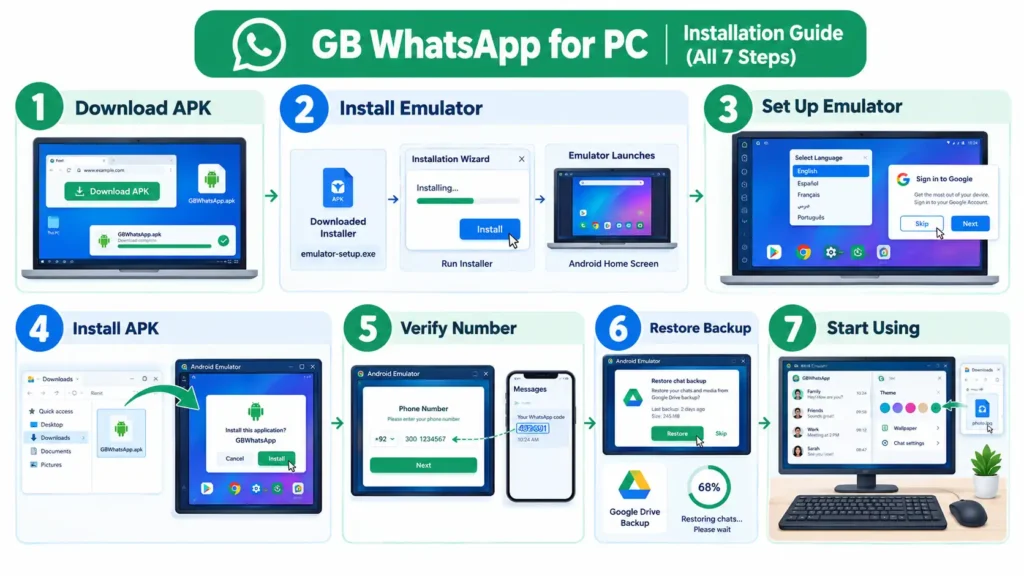
Here is the exact process we follow on our Windows 11 test laptop. It takes about 15 minutes, and most of that is the emulator download.
- Download the GB WhatsApp APK. Grab v26.97 (about 133 MB) from this page and save it to your Desktop.
- Download BlueStacks 5. Go to bluestacks.com and click Download. Avoid mirror sites.
- Install BlueStacks. Open the installer, click Install Now, and wait. The first launch takes a few minutes while it sets up Android.
- Skip the Google sign in if you like. You do not need a Google account to install an APK.
- Install the APK. Drag the APK file from your Desktop into the BlueStacks window. Or click the Install APK icon on the right sidebar, or press Ctrl + Shift + B, then pick the file.
- Open GB WhatsApp. Its icon appears on the BlueStacks home screen. Allow the contacts, storage, microphone, and camera permissions.
- Verify your number. Follow the next section to get your code.
- Turn on two step verification. Open Settings, then Account, then Two Step Verification, and set a PIN.
Using LDPlayer, Nox, or MEmu Instead?
The steps barely change. Every emulator accepts a drag and drop APK. Alternatively, look for an APK icon on its side toolbar.
How to Verify Your Number on PC
Your verification code arrives on your phone, not in the emulator. So keep your phone nearby. If no code shows up, try these fixes for GB WhatsApp OTP not received.
- Enter your number with the country code, for example +92 for Pakistan
- Wait for the SMS on your phone and type the six digit code into the emulator
- No SMS after the timer ends? Tap Call Me and type the code you hear
- Add your name and photo, and you are done
One number, one app: if you verify the same number you use on your phone, WhatsApp logs your phone out. So use a second number on the PC, or move your account to the PC on purpose.
How to Move Your Chats From Phone to PC
Most guides tell you to “just restore.” But GB WhatsApp cannot restore a Google Drive backup, and the emulator cannot see your phone’s storage. So you copy the backup over by hand.
- On your phone, open GB WhatsApp, then Settings, then Chats, then Chat Backup, and tap Back Up
- Copy the GBWhatsApp folder from your phone to your PC with a USB cable
- In BlueStacks, open System Apps, then Media Manager, then Import from Windows, and import the folder’s files
- Using a file manager inside the emulator, place the folder in internal storage so the path reads GBWhatsApp/Databases
- Uninstall and reinstall GB WhatsApp in the emulator, verify the same number, and tap Restore
Keep in mind that this moves the account itself. After that, your phone stops receiving messages on that number.
Method 2: Use GB WhatsApp Web Without an Emulator
Want GB WhatsApp on a work laptop where you cannot install anything? Then link it to WhatsApp Web. Your phone keeps GB WhatsApp, and the browser becomes a second screen.
- On your PC, open web.whatsapp.com in Chrome, Edge, or Firefox
- On your phone, open GB WhatsApp and tap the three dot menu
- Tap Linked Devices, then Link a Device
- Point your phone at the QR code on your PC screen
- Your chats load in the browser within seconds
Prefer an app window? Install the official WhatsApp app from the Microsoft Store and scan its QR code the same way.
What Works and What Does Not on the Web
| Feature | On WhatsApp Web |
|---|---|
| Send and receive messages, files, voice notes | Works |
| Ghost Mode and hidden typing | Not on the PC side |
| Hidden blue ticks | May not apply when you open chats on the PC |
| Anti delete messages | Only on the phone |
| Themes and fonts | No, you see the standard web design |
| Scheduler and auto reply | Run from the phone |
Privacy trap most people miss: GB WhatsApp hides blue ticks inside the phone app. WhatsApp Web is a separate official client, so opening a chat there can still mark it as read. If hidden ticks matter to you, read those chats on your phone or use the emulator.
Is linking failing with an error? Update to v26.97, because that release specifically fixed device linking.
How to Install GB WhatsApp on Mac
The Mac setup depends on your chip. Click the Apple menu, then About This Mac, and check the Chip line.
Apple Silicon Mac (M1, M2, M3, M4)
Use BlueStacks Air. BlueStacks built it for Apple Silicon, and it left beta in May 2025. In our test on an M2 MacBook, GB WhatsApp installed and verified without problems.
- Download BlueStacks Air from bluestacks.com
- Open the .dmg file and drag BlueStacks Air into Applications
- Launch it and allow any permissions macOS asks for
- Drag the GB WhatsApp APK into the window to install it
- Open GB WhatsApp and verify your number
Intel Mac
Use NoxPlayer for Mac or an older BlueStacks for Mac build. The steps match the Windows guide above.
Simplest Mac option: the official WhatsApp app for Mac from the App Store links to GB WhatsApp on your phone, just like WhatsApp Web.
GB WhatsApp on Linux and Chromebook
Chromebook
Most Chromebooks run Android apps natively, so you need no emulator. Turn on Android apps in Settings, move the APK into Downloads, and open it from the Files app.
Linux
Advanced users can run Android apps through Waydroid on Ubuntu and similar systems. It works, but it takes some terminal setup. For most people, WhatsApp Web linked to GB WhatsApp is the easier path on Linux.
How to Run Two GB WhatsApp Accounts on One PC
Emulators can run several separate Android systems at once. Each one holds its own GB WhatsApp and its own number.
- Open the BlueStacks Multi Instance Manager from the right sidebar, or press Ctrl + Shift + 8
- Click New Instance, then Fresh Instance, and pick the Android version
- Start the new instance and install the GB WhatsApp APK in it
- Verify your second number there
Each instance uses its own RAM. So on an 8 GB PC, two instances run smoothly, while three may start to lag.
Voice and Video Calls on PC
Calls work inside the emulator, using your PC’s microphone and webcam. First, allow microphone and camera access for BlueStacks in Windows Settings, under Privacy and Security. Then pick your devices in BlueStacks Settings, under Devices.
For clear audio, use a headset. Built in laptop speakers often cause echo on emulator calls.
How to Make GB WhatsApp Run Faster on PC
Inside BlueStacks
- Open Settings, then Performance
- Set CPU to 4 cores if your PC has 6 or more
- Give it 4 GB of RAM if your PC has 8 GB or more
- Choose the Balanced or High performance mode
- Use the Eco Mode toggle when GB WhatsApp sits in the background
On Windows
- Turn on virtualization in BIOS
- Close heavy browser tabs and games
- Update your graphics drivers
- Install the emulator on an SSD
- Switch Windows to the Best performance power mode
How to Update or Uninstall GB WhatsApp on PC
Update
- Back up your chats inside GB WhatsApp
- Download the newest APK from this page
- Drag it into the emulator window. It installs over the old version and keeps your chats
- If it says App Not Installed, uninstall the old one inside the emulator, install the new APK, and restore
Uninstall Completely
Inside the emulator, press and hold the GB WhatsApp icon and choose Uninstall. To remove everything, uninstall the emulator from Windows Settings, then Apps, then Installed Apps.
Is It Safe to Use GB WhatsApp on PC?
The emulator itself is safe when you download it from its official site. The risks come from two places: tampered APK files and WhatsApp’s rules.
- Fake installers: any GB WhatsApp .exe is fake. Delete it
- Tampered APKs: the real v26.97 file is about 133 MB. Scan any file on VirusTotal before installing
- Ban risk: GB WhatsApp breaks WhatsApp’s Terms of Service on any device. The emulator does not remove that risk, so use a secondary number
- Shared PCs: lock GB WhatsApp with a PIN and lock your Windows account, since anyone at the computer can open the emulator
- Antivirus: only add an exception for the official emulator folder, never for a random download
Our setup advice: keep your main number on official WhatsApp and run GB WhatsApp on a second number in the emulator. You get the features without putting your important chats at risk.
GB WhatsApp on PC: Problems and Fixes
BlueStacks Will Not Start or Shows a Black Screen
Turn on virtualization, update your graphics driver, and install the newest BlueStacks. If it still fails, open BlueStacks Settings, then Graphics, and switch the graphics renderer.
“App Not Installed” in the Emulator
The APK is incomplete, or an older GB build from another developer sits in the emulator. Download the file again, uninstall the old app, and retry.
Stuck on “Connecting”
This was the main bug in v26.90. Update to v26.97, then restart the emulator.
Verification Code Not Arriving
Check the country code, wait for the timer, and choose Call Me. Avoid many repeat requests, because each one adds a longer wait.
Emulator Lags or Freezes
Give it more CPU cores and RAM, close other heavy apps, and turn on virtualization. On a 4 GB PC, switch to LDPlayer.
Camera or Microphone Not Working
Allow camera and microphone access for the emulator in Windows privacy settings, then pick the right devices in the emulator settings.
QR Code Will Not Scan for WhatsApp Web
Zoom your browser to 100 percent, clean your phone camera, and make sure both devices are online. Next, update GB WhatsApp to v26.97 if linking still fails.
“This Version Is Expired” Message
Older GB builds stop working over time. Download the newest APK and install it over the old one.
GB WhatsApp on PC vs Official WhatsApp Desktop
Why not just use the official app? Fair question. Here is an honest side by side look.
| Feature | GB WhatsApp (Emulator) | WhatsApp Desktop (Official) |
|---|---|---|
| Install | Emulator plus APK | Microsoft Store or Mac App Store |
| Native app | No | Yes |
| Ghost Mode and hidden typing | Yes | No |
| Hide blue ticks per contact | Yes | No, only all or nothing from your phone |
| Read deleted messages | Yes | No |
| Themes and fonts | Yes | Light and dark mode, limited chat themes |
| Message scheduler and auto reply | Yes | No |
| PC resources | Heavy (full Android system) | Light |
| Encryption | Not independently verified | Verified end to end |
| Ban risk | Yes | No |
In short, the official app wins for everyday work chats. GB WhatsApp in an emulator wins when you want its privacy and customization tools on a big screen.
Pros and Cons of GB WhatsApp on PC
Pros
- Every GB feature on a big screen
- Fast typing on a real keyboard
- Drag and drop files from your PC
- Run two or more accounts with instances
- Saves your phone’s battery
- Free emulators and a free APK
Cons
- No native app, so setup takes longer
- Emulators use a lot of RAM
- Ban risk still applies
- Manual updates for the APK
- Same number cannot run on phone and PC at once
- Weak support on Snapdragon laptops
Final Verdict
If you want the full GB WhatsApp experience on your computer, install BlueStacks 5 on Windows or BlueStacks Air on an Apple Silicon Mac, then add the v26.97 APK. Use a second number, turn on two step verification, and update the APK whenever a new build lands. And if you only need to chat faster at your desk, simply link GB WhatsApp to WhatsApp Web.
Frequently Asked Questions About GB WhatsApp for PC
Can I download GB WhatsApp for PC?
Yes, but not as a Windows program. You download the GB WhatsApp APK and run it inside a free Android emulator such as BlueStacks or LDPlayer.
Is there a GB WhatsApp .exe file for Windows?
No. GB WhatsApp only exists as an Android APK. Any .exe file that claims to be GB WhatsApp is fake and may contain malware.
How do I install GB WhatsApp on Windows 11?
Install BlueStacks 5 from bluestacks.com, drag the GB WhatsApp APK into its window, open the app, and verify your number with the code sent to your phone.
Can I use GB WhatsApp on Windows 10?
Yes. The emulator method works the same way on Windows 10 and Windows 11.
Does GB WhatsApp work on Windows 7?
It can. BlueStacks supports Windows 7 and 8 up to version 5.21.300, and that version still runs GB WhatsApp v26.97.
Can I use GB WhatsApp on PC without BlueStacks?
Yes. LDPlayer, NoxPlayer, and MEmu all work. You can also skip emulators entirely and link GB WhatsApp to WhatsApp Web.
Can I use GB WhatsApp on PC without an emulator?
Only through WhatsApp Web or the official WhatsApp Desktop app linked to GB WhatsApp on your phone. Most GB features stay on the phone with that method.
Which emulator is best for GB WhatsApp?
BlueStacks 5 suits most Windows PCs, LDPlayer 9 suits low RAM laptops, and BlueStacks Air suits Apple Silicon Macs.
How much RAM do I need for GB WhatsApp on PC?
At least 4 GB, but 8 GB gives a smooth experience, especially if you run two accounts.
Can I use the same number on my phone and PC?
Not in two GB WhatsApp installs at once. Verifying on the PC logs your phone out. Use a second number, or link your phone to WhatsApp Web instead.
Does GB WhatsApp Web work?
Yes. Recent builds support Linked Devices, so you can scan the QR code on web.whatsapp.com. However, Ghost Mode, anti delete, and themes do not carry over to the browser.
Will WhatsApp Web show blue ticks if I hide them in GB WhatsApp?
It can. WhatsApp Web is an official client, so opening a chat there may send read receipts even if GB WhatsApp hides them on your phone.
Can I install GB WhatsApp on a Mac?
Yes. Use BlueStacks Air on M1 to M4 Macs, or NoxPlayer on Intel Macs, then install the APK inside it.
Can I move my phone chats to GB WhatsApp on PC?
Yes. Back up on your phone, copy the GBWhatsApp folder to your PC, import it into the emulator’s storage, then reinstall and restore.
Can I restore a Google Drive backup on PC?
No. GB WhatsApp only restores local backups, so copy the backup folder manually.
Can I make video calls with GB WhatsApp on PC?
Yes. Allow camera and microphone access for the emulator in Windows settings, and calls work through your webcam and mic.
Can I run two GB WhatsApp accounts on one PC?
Yes. Create a second instance in the BlueStacks Multi Instance Manager and verify another number there.
Is GB WhatsApp on PC safe?
The emulator is safe from its official site. The real risks are tampered APK files and a possible account ban, so verify the file and use a secondary number.
Can my account get banned for using GB WhatsApp on PC?
Yes. The ban risk comes from GB WhatsApp itself, not the emulator. Keep the app updated and avoid bulk messaging.
Do I need a Google account for the emulator?
No. You can skip the Google sign in and install the APK directly.
How do I update GB WhatsApp on PC?
Back up your chats, download the newest APK, and drag it into the emulator. It installs over the old version.
Does GB WhatsApp work on a Chromebook?
Yes. Most Chromebooks run Android apps natively, so you can install the APK without an emulator.
Can I use GB WhatsApp on a laptop?
Yes. A laptop works exactly like a desktop. Just make sure it has at least 4 GB of RAM and virtualization turned on.
Why can’t Windows 11 open the APK directly?
Microsoft ended the Windows Subsystem for Android on March 5, 2025, so Windows can no longer run Android apps without an emulator.